How to Connect Your Etsy Shop to Claude
Claude is great at writing titles, tags and descriptions, but by default it can’t see your shop. You end up copying listings in and pasting answers back out, one at a time.
With ConnectMyShop, Claude can look at your real Etsy shop, find what needs attention and prepare changes for you. Nothing goes live until you approve it. Setup takes about two minutes, with no code and no API keys.
Why connect your Etsy shop to Claude?
Ask in plain English and Claude does the digging through your listings:
- Find listings that get views but no sales
- Spot listings with fewer than 13 tags
- Rewrite titles for the season across many listings
- Raise or lower prices for only certain sizes
- Draft new listings as unpublished drafts
- Summarize this week’s orders or low stock
It’s especially handy for shops with lots of listings, like print-on-demand sellers updating titles, tags and prices every season.
What you need
- An Etsy seller account with a shop.
- A free ConnectMyShop account. You create it by signing in with Etsy.
- A Claude account on the web or Claude Desktop. On Team or Enterprise, an Owner may need to add the connector for your organization first.
Step-by-step: connect Etsy to Claude
Step 1: Connect your Etsy shop to ConnectMyShop
- Go to connectmyshop.app and click Connect your shop.
- Choose whether to include order summaries, then sign in on Etsy’s own page. Your password is never shared with ConnectMyShop or Claude.
Your dashboard then shows your connector link, plus a 20-second setup video for Claude.
Step 2: Add ConnectMyShop as a connector in Claude
- Open Claude and go to Customize → Connectors.
- Click + Add, then Add custom connector.
- Name it ConnectMyShop.
- Paste this link as the server URL and click Continue:
https://connectmyshop.app/mcpStep 3: Sign in and choose permissions
- Click Connect and sign in with Etsy (or your passkey).
- Choose what Claude may do: read your shop, suggest changes, see order summaries, and (optionally) publish.
- Click Allow.
Back in Claude, the ConnectMyShop page lists each tool, and you can choose when Claude may use it.
Step 4: Ask in a chat
Start a new chat and ask about your shop. If Claude doesn’t use ConnectMyShop, open the + menu in the chat and make sure it’s turned on.
Prompts you can copy
- “Which of my listings get views but no sales?”
- “Find listings with fewer than 13 tags and suggest tags for them.”
- “Rewrite the titles of my five lowest-view listings for Etsy search, keeping each under 140 characters.”
- “Raise prices on all my sweatshirts by 10%, but only the 2XL and larger sizes.”
- “Add the tag ‘teacher gift’ to every listing with ‘teacher’ in the title.”
- “Make my descriptions easier to read.”
- “Summarize this week’s orders.”
- “Undo the price change you made this morning.”
How approvals and safety work
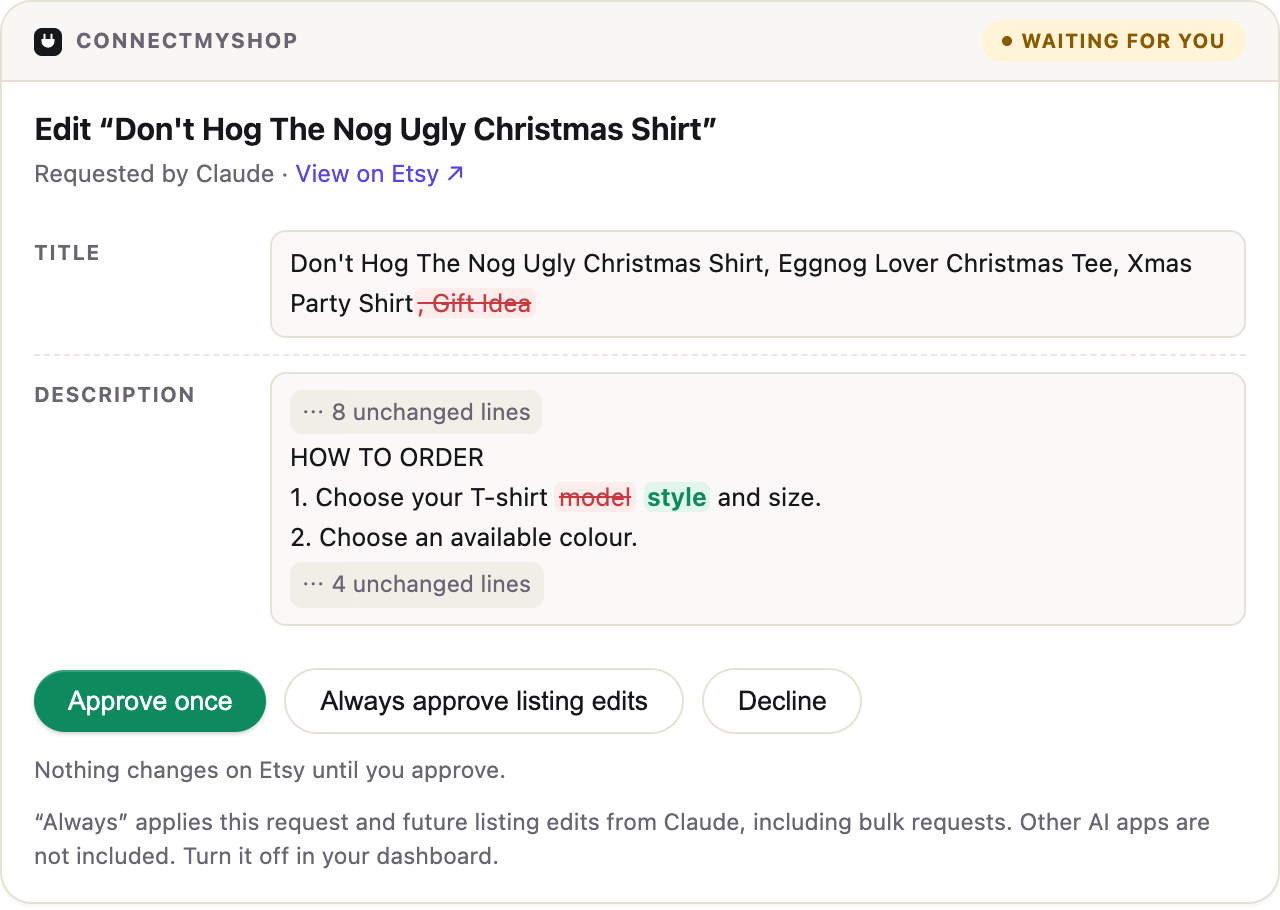
Claude can only propose changes. You decide. Each proposal shows up as an approval card in your chat and in your ConnectMyShop dashboard, with a before-and-after preview: changed words highlighted, tags added and removed, and prices per variant. Then you choose:
- Approve once
- Always approve that kind of change from Claude
- Decline
Other built-in protections:
- No surprise overwrites. If you edited the listing on Etsy after the preview, the change is skipped.
- Drafts first. New listings are saved unpublished, and publishing is a separate permission that’s off by default.
- No deleting. Deleting listings isn’t supported.
- Undo. Edits, price changes and deactivations can be undone from your dashboard, and prices are restored exactly.
- Expiry. Requests expire after 24 hours.
- Full history. Every request and approval is logged.
Your data stays private: Etsy signs you in directly, your access tokens stay encrypted and are never handed to Claude, buyer names, addresses and contact details are never shared with the AI, and your shop data isn’t sold or used to train AI.
Troubleshooting
I can’t find “Add custom connector.” Go through Customize → Connectors, not the connector list inside a chat. On Team or Enterprise, ask an Owner to add it.
Claude says it can’t make a change. Check Claude’s permissions in your ConnectMyShop dashboard. Editing, drafts and publishing are separate switches.
I approved a change but it didn’t apply. Approvals expire after 24 hours, and a change is also stopped if the listing changed on Etsy after the preview. Ask Claude to propose it again.
FAQ
How much does it cost? The Free plan covers 100 Etsy requests a day, about 20–30 listing edits. Basic is $9.99/month or $99/year (2,000 a day), and Pro is $24.99/month or $249/year (5,000 a day). All features are on every plan. You use the Claude plan you already have, with no extra AI subscription.
Is it safe? Every change waits for your approval with a clear before-and-after, you can undo edits and price changes, and Claude never gets your Etsy password or tokens. You can disconnect Claude or your whole shop in one click.
Does it work in Claude Desktop? Yes, the same connector works on the web and in Claude Desktop.
Does it work with ChatGPT too? Yes, see How to connect your Etsy shop to ChatGPT.
What’s “MCP”? It’s the standard way AI assistants plug into other apps. You don’t need to know anything about it to use ConnectMyShop.
Start free
Plug your shop into Claude in about two minutes and try it on your real listings.
The term “Etsy” is a trademark of Etsy, Inc. This application uses the Etsy API but is not endorsed or certified by Etsy, Inc. Claude is a trademark of Anthropic, PBC.